


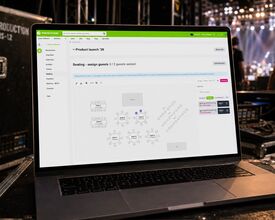
One visual floor plan that seats your guests, guides your attendees and briefs your door staff. Now launching in beta for eventplanner.PRO users.
Every organiser of a seated event knows the ritual. A spreadsheet with table numbers. A printout of the room, annotated in three colours of pen. A late-night message from the caterer asking who exactly is at table 14 now. And on a ticketed show, the same question from the other side: attendees who want to know where they'll be sitting before they register, and an organiser who can't tell them yet.
Seating, the newest tool in eventplanner.net, replaces all of that with a single visual floor plan that stays in sync with your guest list and ticketing. You draw the room once, and from that moment, everything from placing guests to the seat number on the door scanner runs from the same plan.
It launches today in beta for eventplanner.PRO subscribers. And we're looking for organisers to put it through its paces.
One tool, two ways to seat
Seating works differently depending on who decides where people sit: you, or your attendees.
For guestlist events, think weddings, galas and award dinners, you're in charge. Drag invited guests onto seats on the plan. Guests who haven't replied yet appear as placeholders, so you can already sketch the room before the last RSVP comes in. If someone declines, their seats automatically free up, so no more crossing names off a printout.
For ticketed events, your attendees choose their own seats when they claim their tickets. The system proposes the best available seats together; the attendee can adjust on the map, and a countdown holds their selection while they complete their order. The picker works on mobile, pinch-to-zoom included, and the layout logic avoids leaving those awkward orphaned single seats scattered around the room. Ticketing on eventplanner.net is available for free-of-charge events today; paid ticketing arrives later this year, and Seating is built to work with it from day one.
You can even mix both in one event: a seated grandstand next to a general-admission standing floor, each with its own ticket types.
Built like a floor plan, not a form
The heart of Seating is a drag-and-drop designer. Round tables, rectangular and square tables, rows of seats, ... plus decor elements like a bar, DJ booth, or dance floor, so the plan looks like your actual room.
Numbering is handled for you. Every table and row gets a unique number automatically, and rows can follow theatre-style odd/even numbering. Prefer your own labels? Relabel anything by hand.
Some seats simply shouldn't be available: the chair behind a pillar, a broken seat, a production hold. Mark them as blocked, and they disappear from selection and from your capacity counts.
The seat travels with the ticket
Once an attendee picks a seat, it follows them everywhere: on the confirmation email, on the ticket PDF, and on the check-in scanner. Door staff see "Row A, seat 12" the moment they scan - no separate list, no radio calls to the box office.
Meanwhile, you watch the room fill up live. The occupancy view shows who booked which seat, with running totals for booked, free, and blocked seats. When it's time to brief your team, print the floor plan with names or export the full seating list - per table, per seat - to Excel. Or even easier, your team just checks the eventplanner.net app!
Now in beta - and we'd like your help
Seating is live in beta for all eventplanner.PRO subscribers. Beta means exactly what it says: the tool is new, we're still refining it, and the organisers who use it now will shape where it goes next.
That's the ask. If you're planning a wedding, gala, conference or seated show in the coming months, open the Seating tool in your event, draw your room, and run your event on it. Then tell us everything: what felt effortless, what got in your way, what you'd want next. You can send feedback straight from the tool.
Your spreadsheet has earned its retirement. Help us make sure it never comes back.
Seating is available now in beta for eventplanner.PRO subscribers, as part of our event software tools alongside Tickets, ChecklistsSuppliersBriefings and Budgets. Not on PRO yet? This is a good moment to upgrade.
Source: Photo: AI background, real screenshot