


Curate Ideas and Explore Vendors with Event Moodboards
Build an inspiration board and research vendors in one place. Organise planning ideas and access a location-based vendor directory directly from your event moodboard.
Trusted by 179,000+ Event Organisers












Capture and Turn Event Ideas Into Real-Life Action
The event moodboard is where you can shape your creative vision. It also connects you to a wide network of event vendors and venues, simplifying your search.
Decide How Your Event Will Look and Feel
- Gather your theme ideas in one dynamic space.
- Sift through visual inspiration to define your event vision.
- Refine your event ambiance and decor within one dashboard.
Start Your Vendor Research With a Click
- Explore vendors without leaving the event software.
- Save and organise your top picks for easy access later.
- Stay on top of planning with a unified vendor view.
Find Vendors Who Fit Your Event Vision
- Look into event vendors that are located near you.
- Filter your options based on service type and amenities.
- Evaluate top choices side by side for easier comparison.
Achieve Alignment Over Vision and Execution
- Share your event vision with team members and clients.
- Simplify decision-making with a unified view of all options.
- Co-create with team and clients on vision and execution.
Discover Your Event Planning Toolkit
Learn how event moodboards integrate with other planning features within our event software.
Checklists
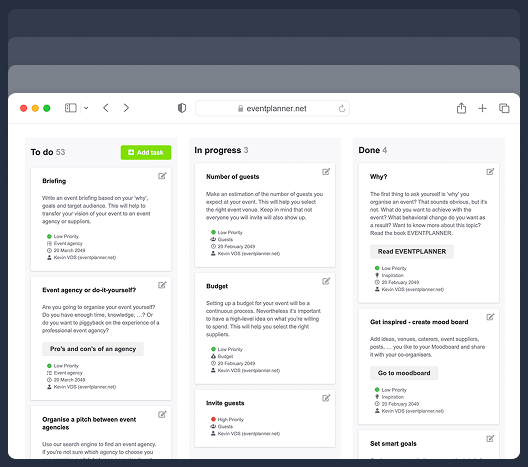
Keep track of every planning detail. Create and assign tasks to your team members, and never miss a deadline.
Budgets
Manage your event budget and expenses. Get a complete overview of fund allocation and track your spending.
Ticketing
Generate event tickets and manage on-site registration. Create easy check-in experiences for your attendees.
Call Sheets
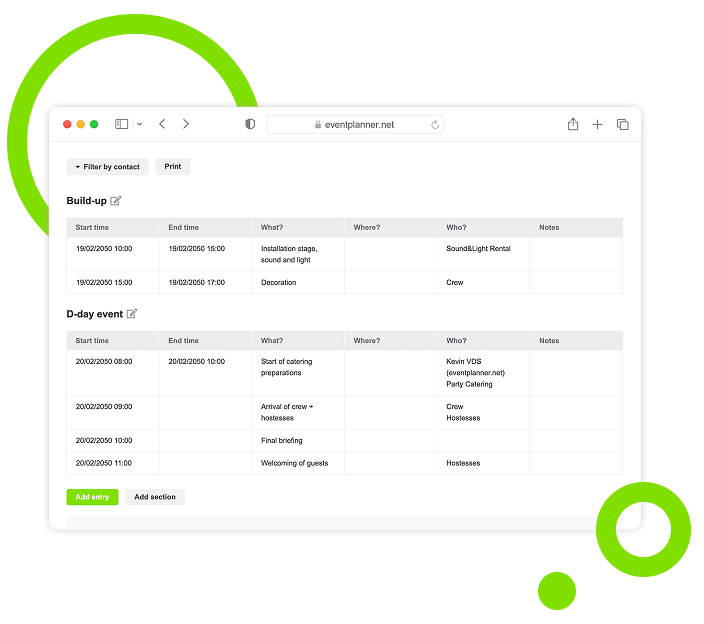
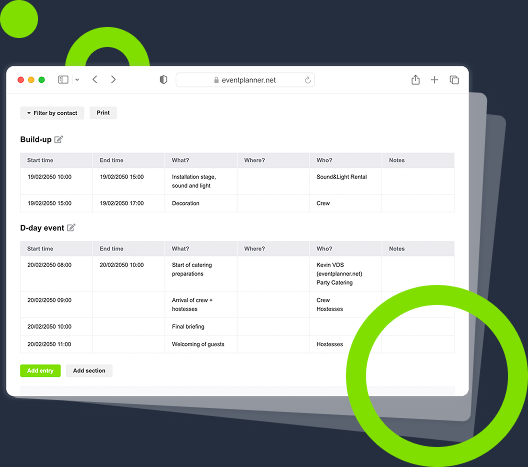
Create a task list for pre-event and event days. Organise your team so everyone knows their responsibilities.
Suppliers
Manage every event partner from one workspace. Link them to budgets, call sheets, and the briefings they need.
Briefings
Build structured briefings that combine generic and supplier-specific instructions, all linked to the right partner.
Event Diagramming
Draw your event floor plan to scale, place tables, stages, bars and walls, and send the layout to your venue.
3D Event Design
Turn your floor plan into a 3D model, walk through it and view the venue before the event.
Plan / Seating
Design a floor plan, assign guests to seats, or let ticket buyers pick their own seat while ordering.
From Inspiration Overload to Event Concept
It is easy to feel stuck with many event ideas. Capture them with a click and turn them into a clear vision.
Manage Your Event Vision in One Dashboard
No more scattered ideas across multiple note apps or devices. Consolidate inspiration into one visual moodboard, accessible from anywhere.
Collect Ideas as Visual Cards for Clarity
No more drowning in browser tabs and bookmarks. Save ideas and external links as visual cards to your board, and organise them anytime.
Pin Articles and TV Episodes for Easy Reference
Found an idea for managing your event and want to keep it handy? Pin our articles and TV episodes to your moodboard for quick access when you are ready to use them.
Connect Ideas to the Right Vendors
Struggling to align concept with execution? Match every creative idea with the right vendors directly from your event moodboard.
From Chaos to Centralized Vendor Research
When you have to look for vendors in multiple places, details get missed. Unify your research for better control.
Countless Vendors, Unified Search
Tired of jumping between vendor websites? Access a unified, location-based vendor repository with all the information you need at a glance.
Simplify Shortlisting with One Click
Manually adding event vendors to your spreadsheet takes time. Use the event moodboard to quickly filter and save your favorite vendors.
Explore Standardised Profiles for Each Vendor
Our repository is built on standardised vendor cards. Each business page includes an overview, reviews from past clients, news updates, a map, and activities.
Automatically Group Your Vendors and Ideas
Find your pinned items in seconds. The system automatically groups your vendors, articles, and external links, making it easy to navigate your resources.
From Option Fatigue to Reliable Vendors
Finding the right vendor can feel endless when you cannot search based on your specific event requirements.
Filter Vendors by Service Type
Planning an event means juggling multiple vendor types. Choose a category filter, like venue or catering, to narrow your search and find what you need.
Filter Vendors by Specific Criteria
Even in the right category, wrong vendors can still clutter your search. Use granular filters, like venue facilities or cuisine type, for accurate results.
Read Reviews to Gauge Trustworthiness
A vendor profile rarely tells the whole story. Filter by rating and read reviews to identify reliable vendors and avoid surprises down the line.
Compare Top Choices Side by Side
Even with a refined shortlist, comparing vendors across multiple tabs or documents is difficult. View top contenders side by side for easy comparison.
From Silos to Joint Event Decision-Making
Managing ideas, venues, and event vendors across different channels can create misalignment. Centralise team collaboration.
One-Click Sharing for Team-Wide Access
End fragmented ideas and vendor discussions. Give your team and clients access to a single event moodboard. Keep everyone aligned and up to date.
Enable Team Members to Add Vendors
Great vendors can be missed when one person controls the list. Let your team or clients add favorite suppliers or ideas to your shared event moodboard.
Keep a Unified View of Your Event Vision
Back-and-forth communication slows decisions and causes confusion. Use the event moodboard as a central reference to speed up decision-making.
Assign Permission Levels to Team and Clients
Have full control over who can contribute to the event vision. You decide which team members and clients get viewing or full editing rights on the event moodboard.
Preserve and Reuse What Works
Keep your strongest creative directions and supplier selections available for future events.
Build on the Success of Your Previous Event Ideas
Do not start events from scratch. Preserve event ideas and validated vendors for later use.
-
Archive event moodboards for future reference.
-
Duplicate vendor shortlists to access past knowledge.
-
Share archived ideas with new team members.
-
Speed up event prep by starting with a proven vision.
Event Moodboards, a Tool for Inspiration and Action
Build your vision and turn it into action. Use event moodboards to curate ideas and find the right event venue and vendors to bring them to life.
Create a Structured, Visual Layout
No more text-heavy spreadsheets. A moodboard lets you see your event concept and vendor details at a glance.
Discover What You Need, Faster
Quickly filter out irrelevant options and instantly add relevant ones to your board. Eliminate repetitive checks.
Centralise Your Vision, Eliminate Silos
Share event ideas and vendor pool with your team and clients. Eliminate missed updates and uncertainty.
Recycle Past Event Assets
Save moodboards as blueprints. Plan next events faster with access to proven ideas and vendors.
Frequently Asked Questions
-
Can I add only vendors I find on eventplanner.net?
You do not have to limit yourself to vendors on eventplanner.net. You can also add your favorite event vendors and venues by pinning a link.
-
How can I share the event moodboard with my team?
Sharing your moodboard is simple. You can use one-click sharing to give your team access. Team members can, depending on rights, view, edit, and add input directly to keep everyone aligned.
-
How can I share the event moodboard with my clients?
Yes, you can give clients access just like team members. You control their access level, so you decide whether they can view only or collaborate on the moodboard and other tools.
-
What vendor types does your directory provide?
Our directory includes catering, decoration and stand building, entertainment, event agencies, event staff, event venues, freelancers, insurance, marketing and promotion, music, photo and video, rental, sale, security, software, team building, and transport and traffic providers.
-
What if my favorite vendors are not on the list?
If your favorite vendors are not listed, you can invite them to register for free on eventplanner.net and create their business page. As an alternative, you can add a link to the vendor website directly to your moodboard.
-
What happens to my archived moodboards?
Archived moodboards and events remain stored in your account for future reference. You can revisit them to reuse vendor selections, review concepts, or duplicate them for similar events.
-
Is there a storage limit, and how long can I access past event data?
The platform offers generous storage for archived and active moodboards, with no strict limits for most users. Past event data remains accessible as long as your account is active. For unlimited use, consider upgrading to .PRO.
-
Can I set different permission levels for team members?
Yes, you can assign different permission levels. Some people can have full editing rights, while others can have view-only access. Access can also be limited across modules.
-
Can I request vendor quotes directly from the platform?
Yes. You can request quotes directly from vendors listed on your moodboard, and collaborate with those vendors within the broader event software.
-
What is an event moodboard?
An event moodboard is a visual collection of references - venues, decor, suppliers, colours, posts, articles - that captures the feeling and direction of an event before any commitments are made. It is where the concept lives in its earliest form: not a brief, not a budget, but a mood. Used well, a moodboard is the artefact that aligns the people involved (the client, the team, the partner planning with you) on what the event should feel like, before anyone argues about what it should cost.
-
How do I create a wedding moodboard?
Start by collecting, not curating. Pin venues, florists, photographers, table settings, lighting concepts, dresses, food styling - anything that catches your eye - without filtering at first. Once you have 30-50 references, patterns will emerge: a colour palette, a level of formality, an indoor-outdoor preference, the kind of light you keep coming back to. That pattern is your concept. With eventplanner.net, you create a moodboard tied to your wedding event, pin venues and suppliers from the directory directly, save inspiring posts and articles, and add external links to anything you spot elsewhere on the web. The board is shareable, so your partner, your wedding planner, or the parents helping organise can pin alongside you. Once the visual direction is settled, the same event automatically connects to your wedding budget, checklist, and supplier list - so the moodboard becomes the starting point of the actual planning, not a separate document that gets forgotten. eventplanner.net's wedding planning software is built around exactly this idea: the moodboard, the budget, the timeline, and the supplier list all live in one workspace, so nothing falls between the gaps.
-
How is an event moodboard different from a Pinterest board?
The visual gathering is similar - Pinterest is a fine inspiration tool. The difference is what comes next. A Pinterest pin is a link to a photo. A pin in eventplanner.net is a link to a real venue or supplier you can request a quote from, save to your shortlist, and eventually book - all without leaving the platform. The moodboard sits inside the same workspace as your budget, checklist, supplier list and even your guest list, so the inspiration phase connects directly to the planning phase rather than living in a separate app you eventually copy out of.
-
Can multiple people work on the same moodboard?
Yes. Invite co-organisers, your client, or your event team to the same event and they can pin to and view the moodboard alongside you. This works particularly well in two cases: clients and event agencies aligning early on the visual direction, and couples planning a wedding together where both partners want a say in the look and feel.
-
How does a moodboard help when briefing a venue or supplier?
A briefing written in words alone leaves a lot of room for interpretation - 'elegant', 'warm', 'modern' mean different things to different suppliers. A moodboard removes that ambiguity. Sharing a board with a caterer, a florist, or an event agency lets them see the style, atmosphere and quality level you're aiming for, which leads to better-targeted proposals and far less back-and-forth at the quote stage. In eventplanner.net, you can attach a moodboard reference directly to a supplier briefing so the visual direction travels with the brief.
-
How many moodboards can I create?
One per event, with no limit on the number of events you create over time. Free users can keep one event active at a time and unlimited sequential events; .PRO users can run multiple events in parallel. Items pinned to one moodboard stay with that event - so previous weddings, conferences, or product launches remain accessible as a personal reference library you can draw on for future projects.
-
Is the moodboard tool free?
Yes. Moodboards is part of the free tier of eventplanner.net, with no time limit and no payment details required. The same is true of checklists, basic budgets, callsheets and ticketing; supplier management and briefings are part of .PRO.
-
Can I share my moodboard with my client (or my partner) without giving them a full account?
Yes. You can invite them to the event as a collaborator with view or comment-only access, so they can see the moodboard and weigh in without being able to change other parts of the planning. For wedding couples, this is the simplest way for both partners to build the board together and share it with their wedding planner. For agencies, it's how you keep the client involved in the creative direction without exposing the budget or supplier commercials. For in-house teams, it's how you keep stakeholders aligned without giving them access to the full planning workspace.
free forever
Perfect for professionals and smaller event planning teams managing one event at a time.
from per seat/month
Great for professionals and larger teams managing multiple events at a time.
from per month
Perfect for organisations requiring custom solutions, advanced security, and dedicated support
Event Planning Software That Grows With You
Select a plan that matches your ambitions, whether you're managing a single event or running multiple projects simultaneously.